
Friday’s post on funding open source without the bait-and-switch covered the model behind this week’s releases. Here are two more features from it.
Both ship this week. Both are small. Both live in core: no cn1lib to add, no native interface for you to write. They follow the same pattern you have seen across Codename One for years. There is a portable Java API, it calls through to native behavior where the platform supports it, and it falls back to something reasonable everywhere else.
One handles security. The other handles asking users for a rating without annoying them. They are unrelated features that happened to land in the same week, so I am covering them together.
Device integrity
com.codename1.security.DeviceIntegrity is a portable runtime self-protection (RASP) and attestation API. It exists for the apps that actually need it: banking, payments, anything where you have to detect a hostile runtime and react to it. We already serve several customers in banking, and Codename One is hardened to meet the requirements they bring; this API is part of that work. If your app is a recipe browser, you can skip this section.
There are four capabilities. Each one has a zero-code build hint that turns it on, and a runtime API you call when you want to make decisions in Java.
| Need | Build hint (zero-code) | Runtime API |
|---|---|---|
| Play Integrity launch gate | android.playIntegrity (+ .verifyUrl) | requestIntegrityToken(nonce) |
| iOS App Attest | ios.appAttest (+ .environment) | requestIntegrityToken(nonce) |
| RASP root/jailbreak/Frida | android.rootCheck, android.fridaDetection, ios.detectJailbreak | isDeviceCompromised(), getCompromiseReasons() |
| Accessibility-abuse guard | android.accessibilityGuard (+ .allow, + .mode) | getEnabledAccessibilityServices(), hasUntrustedAccessibilityService(...), setSecureScreen(bool) |
The design mirrors the existing isJailbrokenDevice() chain. The API surfaces through Display, defaults to “unsupported” in CodenameOneImplementation, and gets overridden in the Android and iOS ports. On Android, Play Integrity and RootBeer are invoked via reflection so the port jar stays dependency-free; the SDK is only on the classpath when the build hint bundles it. On iOS, App Attest goes through DCAppAttestService, gated behind a CN1_USE_APP_ATTEST macro with a stub #else so a build without attestation neither imports nor links DeviceCheck.framework. The async result comes back through static callbacks, the same shape as IOSBiometrics.
Requesting a token looks like this. The nonce comes from your server, and the token goes straight back to your server.
String nonce = myBackend.fetchIntegrityNonce();
DeviceIntegrity.requestIntegrityToken(nonce).ready(token -> {
    // token is opaque to the client; only the server can read it
    myBackend.verifyIntegrity(token);
});
A cheaper signal, no round trip:
if (DeviceIntegrity.isDeviceCompromised()) {
    for (String reason : DeviceIntegrity.getCompromiseReasons()) {
        Log.p("RASP signal: " + reason);
    }
}
The most important sentence in this section: the client is not the security boundary. An attestation token is opaque. The API hands the signed token to your app, but the block-or-allow decision has to happen on your backend, because the verification keys live there and the device does not get a vote. If you treat isDeviceCompromised() returning false as proof the device is clean, you have built nothing. A determined attacker who controls the device can tamper with what your app sees. RASP signals are defense-in-depth that raise the cost of an attack. They are not a guarantee!
The accessibility-abuse guard deserves a note because it is the newest of the four. Overlay and accessibility-service malware is a real vector for reading and driving banking apps. getEnabledAccessibilityServices() tells you what is active, hasUntrustedAccessibilityService(...) evaluates that list against an allow-list you configure with android.accessibilityGuard.allow, and setSecureScreen(true) blocks screen capture on sensitive forms. The allow-list evaluation is exactly what DeviceIntegrityTest exercises across its six tests.
There is also a new security chapter section in the developer guide that walks through wiring the token verification on the server side.
App review
com.codename1.appreview solves a smaller problem: asking for a rating at the right moment, through the right channel. It uses the platform’s native store-review prompt when one exists, falls back to a built-in Codename One widget where it does not, and leaves the decision of when to ask entirely up to you.
There are two ways to use it. The manual style asks whenever your code decides it makes sense:
AppReview.getInstance().requestReview();
The scheduled style lets you set thresholds and then forget about them. You call registerSession() on every launch, and the scheduler decides whether the moment is right:
AppReview review = AppReview.getInstance();
review.setMinimumLaunches(5);
review.setMinimumDaysInstalled(7);
review.setDaysBetweenPrompts(60);
review.registerSession();
State lives in Preferences. Once a user rates or opts out, they are never prompted again. That is the whole point of the defaults: they stop you from over-asking.
The fallback widget does something the native prompts cannot. It splits feedback by sentiment. A high rating (at or above highRatingThreshold) routes the user to the store. A low rating routes to a pluggable FeedbackListener, and an email helper ships in the box. So an unhappy user reaches you privately instead of leaving a one-star public review you can do nothing about. The widget itself is RatingDialog, package-private, stars plus a feedback field.
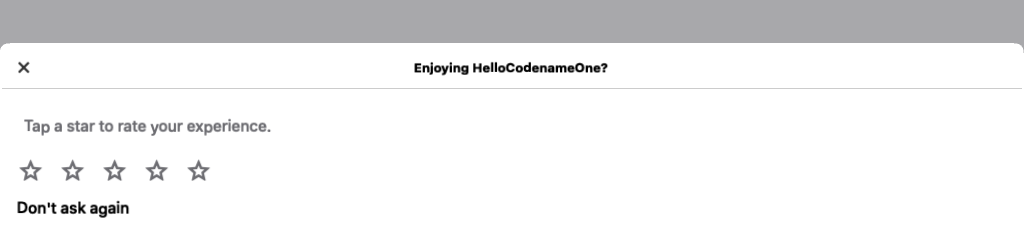
The built-in fallback shown on platforms without a native in-app review prompt. On iOS and Android the native sheet is used instead.
Here is the decision flow end to end:
The native plumbing mirrors share() and dial(). CodenameOneImplementation.isNativeInAppReviewSupported() and requestNativeInAppReview(SuccessCallback<Boolean>) are exposed through Display and CN. On iOS it calls SKStoreReviewController.requestReview (iOS 10.3 and up), guarded by a CN1_USE_APPREVIEW macro. On Android it drives the Play In-App Review flow via reflection, so the port compiles without the extra dependency present.
The dependency part is what I like most here, because you do not configure it. The Android and iOS builders already scan your compiled classes to auto-enable native deps, and this extends that scan. Merely referencing com.codename1.appreview (or the CN/Display review methods) auto-injects com.google.android.play:review on Android, and links StoreKit.framework plus flips CN1_USE_APPREVIEW on iOS. An app that never asks for a review carries no extra weight. There is no build hint to remember and no checkbox to forget. The scheduler logic that decides all this is covered by eight JUnit 5 tests, and there is a new App-Review chapter in the developer guide.
The tradeoff to keep in mind: nagging users for ratings backfires. A prompt at the wrong moment costs you a rating and some goodwill. The scheduler defaults and the never-re-prompt rule exist precisely so the easy path is the restrained one. If you fight them by manually firing requestReview() on every launch, you will earn those one-star reviews.
Wrapping up
Two features, same shape. A portable Java API in core, native behavior where the platform offers it, a sane fallback where it does not, and no native interface for you to write. DeviceIntegrity gives high-security apps the attestation and RASP signals they need, as long as you remember the verification belongs on your server. AppReview gets you ratings without turning into the app everyone mutes. Pull the latest build and try them.
Discussion
Join the conversation via GitHub Discussions.