This is the Tuesday follow-up to Friday’s funding open source without the bait and switch, and it picks up right where last week’s Apple Watch port left off.
The watch work gave us the pattern for a new form factor: a shared API to detect it, resource overrides to theme it, and a builder path to ship it. PR #5261 applies that same pattern to the television. You can now detect a TV at runtime, restyle for it from CSS, ship a single Android APK that also runs on Google TV, and generate a separate Apple TV target from the same project.
All of it is driven by the build. You set a flag or two and the builders generate and build the TV targets for you. The screenshots later in this post are real Codename One UI running on the Apple TV simulator, pulled straight from the tvOS screenshot test suite.
Why TV is its own form factor
A phone and a TV are both screens, but the interaction model is not the same. You sit ten feet away from a TV, so text and focus rings that look fine on a handset become unreadable. There’s no touchscreen, so every bit of navigation runs through a remote and a focus cursor. The aspect ratio is fixed and wide. The “ten-foot UI” is a real constraint, not a skin.
The goal is to keep this one codebase while still respecting those differences. Most of the adaptation is visual, so most of it belongs in your theme rather than in Java branches. A smaller set of behaviors – the things CSS can’t express – get a runtime check.
The form-factor API and the @media styling story
The detection API mirrors the existing isWatch(). You get CN.isTV(), Display.isTV(), and CodenameOneImplementation.isTV(). On iOS that’s backed by a new isRunningOnTV() native call wired to TARGET_OS_TV. On Android it checks the television/leanback feature with a UiModeManager fallback. Resource and theme platform overrides follow the same scheme as the rest of the framework: {tv, ios, appletv} on iOS and {tv, android, android-tv} on Android.
The part with the widest reach is the styling. Resources.loadTheme now selects device-tv and device-watch @media variants at runtime. So you adapt to the living room or the wrist inside your CSS instead of forking layout code in Java:
/* Base style for everything */
Title {
    font-size: 3mm;
    color: #ffffff;
    padding: 1mm;
}

/* Ten-foot UI: bigger type, heavier focus treatment */
@media device-tv {
    Title {
        font-size: 9mm;
        padding: 4mm;
    }
    Button.selected {
        border: 3px solid #ffcc00;
        padding: 5mm;
    }
}

/* The wrist: shrink everything down */
@media device-watch {
    Title {
        font-size: 2mm;
        padding: 0.5mm;
    }
}
That same change finally completed @media for the watch port, which had the override slots but never had the query wired in. Both form factors now read from the same path. It’s covered by CSSDeviceFormFactorMediaQueryTest, which runs against the real CSS compiler rather than a mock, and it’s documented in css.asciidoc.
For the cases CSS can’t reach – behavior, not appearance – you branch in Java:
Form f = new Form("Home", BoxLayout.y());

if (CN.isTV()) {
    // No touch: make the first item focused so the remote has a target
    Button first = new Button("Watch Now");
    f.add(first);
    f.addShowListener(e -> first.requestFocus());
} else {
    f.add(new Button("Watch Now"));
}

f.show();
Keep these branches small. Anything that’s purely a size or color difference should live in the @media block above, not here.
Android TV: one APK, one build hint
Android TV is the low-code switch. You don’t build a separate artifact. The same APK runs on phones, tablets, and the TV. You turn it on with a build hint:
# Build hints
android.tv=true
android.tv.banner=tv_banner.png
When android.tv is set, AndroidGradleBuilder adds the LEANBACK_LAUNCHER intent category so the app shows up on the TV home screen, declares the android.software.leanback uses-feature, marks the touchscreen optional so non-touch devices still qualify, and generates a 320×180 tv_banner (overridable via android.tv.banner). One build, three device classes.
Apple TV: a separate Metal target
Apple TV can’t ride the same binary. tvOS needs its own Xcode target, the same way Mac Catalyst does. The new TvNativeBuilder adds an appletvos target with TARGETED_DEVICE_FAMILY=3, renders through Metal, and excludes the OpenGL-only .m files (tvOS has Metal and most of the iOS APIs, but no OpenGL ES). It reuses the shared UIApplicationMain entry point and is modeled directly on MacNativeBuilder. It’s wired into IPhoneBuilder, the build mojo via the codename1.tvMain build property, and the build-hint schema.
Here’s how one source maps to the three outputs:
+ theme CSS"] FF["Shared form-factor layer
CN.isTV() / isWatch()
device-tv / device-watch @media"] SRC --> FF FF --> ANDROID["Android build"] FF --> IOS["iOS build"] ANDROID --> APK["Single APK
android.tv hint adds
LEANBACK + leanback feature
+ tv_banner"] APK --> PHONE["Phone / Tablet"] APK --> GTV["Google TV"] IOS --> IPHONE["iPhone / iPad target"] IOS --> TVTARGET["appletvos target
TvNativeBuilder + codename1.tvMain
TARGETED_DEVICE_FAMILY=3, Metal"] TVTARGET --> ATV["Apple TV"]
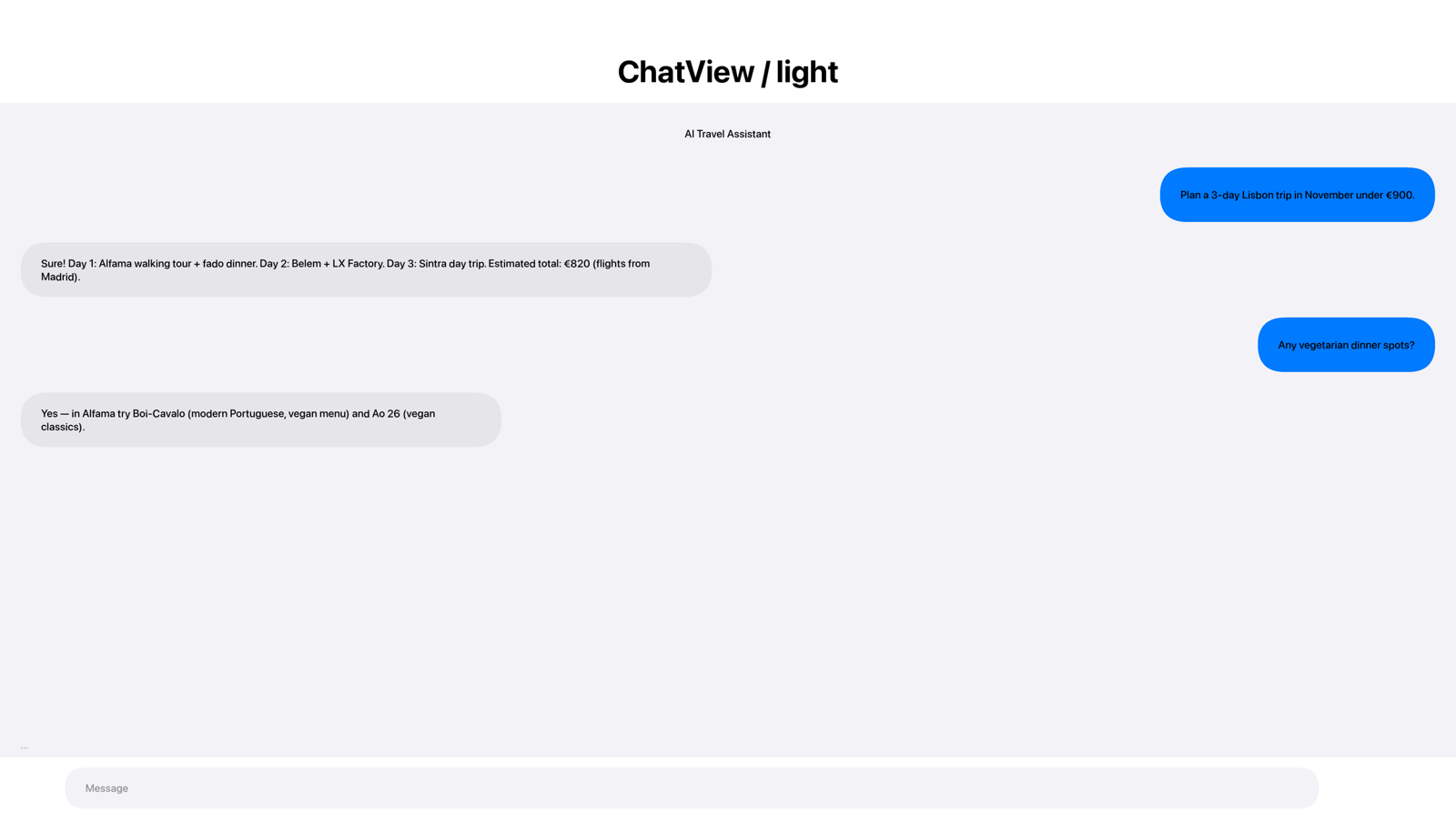
I built the tvOS target end-to-end against the Xcode 26 / tvOS 26 SDK, and the framework’s screenshot suite runs the full component set on the Apple TV simulator. Here is a ChatView screen rendering at the Apple TV’s native 4K, the same Codename One UI the framework draws on every other target:
Turning it on
There is no separate SDK to learn. On Android you set android.tv=true and the same APK gains a TV launcher; on iOS you point the build at the tvOS target with codename1.tvMain and TvNativeBuilder generates the appletvos target. Then you restyle for the ten-foot screen with an @media device-tv block and branch the few behaviors CSS can’t reach on CN.isTV(). The same project, the same code, three more screens.
Wrapping up
The television is now a Codename One form factor, detected with CN.isTV(), themed with @media device-tv, and built with a flag. Set android.tv=true for Google TV and point codename1.tvMain at your tvOS target for Apple TV, and the screens you already wrote show up in the living room.
Discussion
Join the conversation via GitHub Discussions.